 Algeria Agency
Development
Legacy system modernisation: change systems without losing a record
Replacing an old application, a spreadsheet that became critical or a paper procedure — without losing data or stopping work, and only when it is needed.
What you can try for yourself
A demonstration
Twenty years on software with no vendor, and the bench we run before quoting.
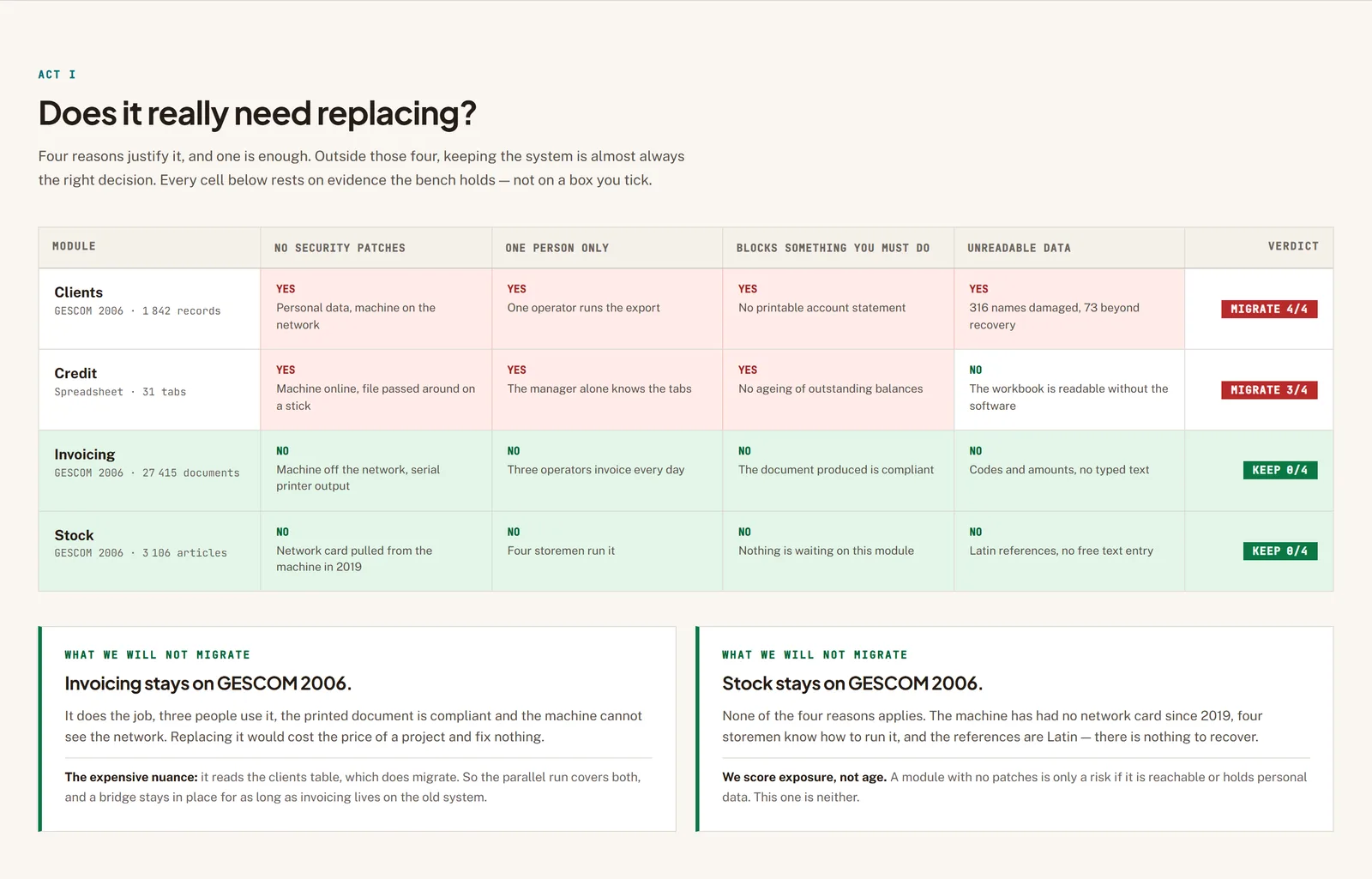
A wholesaler in Boumerdès, twenty years on software whose developer is gone. You run the bench we run before quoting: the four reasons to replace a system, the proof that the data comes out, and both systems running side by side.
See the demonstrationTwo of the four modules come back “keep it”. That is half the requests we get on this subject, and it is what the bench exists to say.
Start with what you will not be told elsewhere: an old system that works is not a problem. A system’s age costs nothing by itself. What costs is that its vendor no longer updates it, that one person alone knows how to run it, that it blocks something you have to do now, or that it holds your data in a format nobody can read. If none of those four applies to you, keep it.
When one of them does apply, the work is not "installing new software". It is recovering what the old system knows — your customers, your stock, your ledger entries, and the unwritten rules your teams have applied for ten years — and making that live somewhere else without breaking anything on the way. The hard part is the recovery, not the development.
The most common case we see is not an old application at all: it is a spreadsheet that became, without anyone deciding it, the company’s central system. It sits on one machine, it carries somebody’s name, it has thirty tabs, and the business stops if the file corrupts. That is a legacy system in full, and it migrates with the same precautions.
We always run in parallel. The old system keeps working while the new one takes the job in pieces, and it stops only when nobody is using it any more. A single big switch over a weekend is the fastest way to lose both the data and the team’s confidence.
What we usually find
- One person knows how to run the software, and they are retiring or have already left.
- The vendor no longer exists, or no longer answers, and nobody has the source code.
- Your data lives in a spreadsheet passed around on a USB stick, with several versions in circulation.
- The software now only runs on one old computer, and nobody dares touch it any more.
What changes
Your data is out and readable
Before any decision, we prove the export is possible and complete. Until that is demonstrated there is no project, only an intention.
The business does not stop
Parallel running, scope-by-scope cutover, a way back at every step. Nobody arrives on a Monday morning to a system they are seeing for the first time.
Nobody is indispensable any more
The rules that lived in one employee’s head are written down, in the code and in a document you keep.
What you get
Data-exit audit
The first job, and sometimes the only one: can the data be extracted in full, in what format, and what is lost on the way? We check on your real files, not on a documentation page.
History migration
Old entries, old customers, old orders. Cleaned, de-duplicated, and reconciled against the old system line by line to prove nothing disappeared.
Bilingual encoding repair
Names typed in Arabic into software that never expected them come out as unreadable characters. This is fixable, and it is a job in itself that few quotes mention.
Writing down the unwritten rules
What the software does is never everything the company does. We sit with the people who use it to recover the exceptions nobody documented.
Parallel running
Both systems run together for as long as it takes, with results compared, until the new one produces the same figures as the old.
A clean shutdown of the old one
An archive readable without the original software, kept by you. A system switched off that nothing can be retrieved from is not a stopped system, it is a lost one.
How we work
What the system actually does
We watch people work before reading anything. The gap between the described procedure and the real one is where the projects that go wrong are hiding.
Proof of extraction
We get your data out for real, in full, and show you what is missing. If extraction is impossible we tell you here, and the project changes shape.
First scope in parallel
One piece of the work moves across, chosen because it is verifiable. Both systems run together and we compare their results.
Extend, then stop
Scope by scope, until the old system has no users left. It is then archived, not merely unplugged.
Is this the right fit for you?
This is for you if
- Your software is no longer updated, or its vendor has disappeared.
- One person knows how to run it, and their departure is foreseeable.
- A spreadsheet has become the central system, and losing it would stop the business.
- You have to do something new — invoice differently, sell online, file differently — that the current system prevents.
This is not for you if
- Your system is simply old and does the job. Keep it, and put the money elsewhere.
- You want to replace it because it is ugly. That is a real reason, but it does not justify this budget.
- You cannot free up the people who use it. Without them the unwritten rules stay unwritten and the new system will be wrong.
- You want everything switched over in a weekend. We will not do that, and we would rather say so before the quote.
What we commit to
The export comes before the quote
We do not price a migration before proving the data comes out. A supplier giving a firm price without that does not yet know what they are selling.
We will tell you to keep the old one
When the system in place does the job, we say so, even when it costs us the project. It is an answer we give often.
Your data stays readable without us
Open formats, a documented schema, and the old system’s archive in your hands. A migration that leaves you dependent on a second supplier has solved nothing.
What a migration runs into in Algeria
The most common problem, and the most underestimated, is bilingual. Many customer files contain names typed in Arabic into software built when universal encoding was not yet routine, and sometimes Arabic transliterated into Latin characters by an operator in a hurry. On export, part of it comes out unreadable and part of it is correct, which is worse: nobody notices the problem until the new system is live.
Then comes the question of who owns what. A great deal of the business software installed here through the 2000s and 2010s was installed by an independent developer or a small outfit that no longer exists, with neither the source code nor the database schema handed to the client. The migration then starts with a negotiation or with reverse engineering, and those are two very different timetables.
Finally, paper is not a leftover: in many companies it is still the register of record, and it holds information that exists nowhere else. A migration that does not plan to recover what the paper knows replaces a complete system with a partial one, and the team is back on paper within the month.
Frequently asked questions
Does software that works really need replacing?
Often not. Four reasons justify it: updates have stopped, only one person can operate it, it blocks something you must do now, or the data is unreadable. If none applies, keep it.
How long does a migration take?
Almost entirely on the state of the data rather than the size of the software. That is why we start with the extraction: until it is done, any duration quoted is a guess. After that, if a deliverable runs late, you are told before the deadline, with a new date.
Can everything be switched over at once?
Technically yes, and we refuse. Parallel running costs a little more and avoids the one risk you cannot recover from: discovering in production that the figures do not match.
Our data is in Excel. Is that a real project?
Yes, and often a more delicate one than an application, because a workbook has no rules: every tab has its own conventions and exceptions, and they are written down nowhere.
The vendor is gone and we have no source code. Is that a blocker?
Not necessarily. What matters is access to the data, not to the code. If the database is readable the migration is possible; if it is encrypted and nobody holds the key, we will tell you plainly.
What happens to the old system afterwards?
It is archived in a form readable without it — exports, a documented schema, and a copy kept by you. Unplugging without archiving means losing the history.
How to start
Write to us and tell us what the current system does, since when, and what worries you most: the missing updates, the one person who knows how to run it, or something it stops you doing.
We start with a data-exit audit. You leave with the answer to "can this be migrated", and an honest answer to "should this be migrated" — which is sometimes no.
Let’s find where your next customers will come from
Tell us where things stand — your ads, your website, your Google listing — and what you are after. We reply within one working day, and the conversation commits you to nothing.
- The export comes before the quote
- We will tell you to keep the old one
- Your data stays readable without us